
How to delete and manage saves in Tomb Raider Remastered
Since at the moment you can only overwrite saved games and not directly delete them from in-game, I wish to recommend you some tools that you can use to manage your savegames.
Tomb Raider I-VI Remastered Savegame Manager
Available on Github, it lets you transfer individual savegames between files, convert between platforms, delete or reorder savegames, and create savegames for any level. Useful for downloading savegames from the Internet without having to replace your entire savegame file, and for level selection.
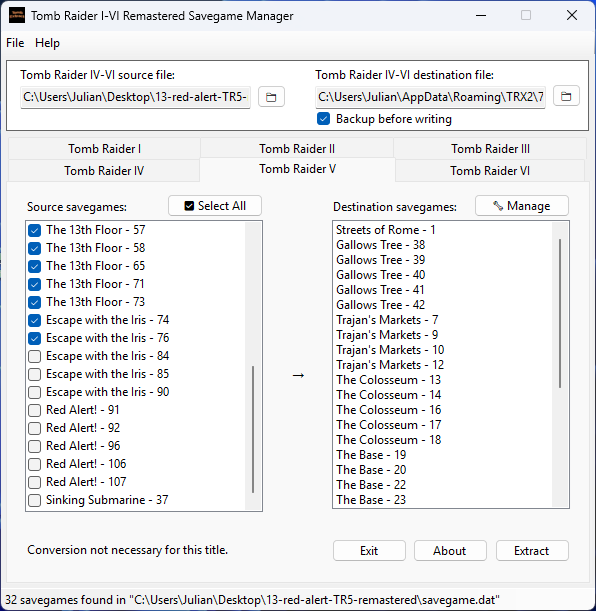
Here are the steps to follow:
- Download the EXE file from the Github link above, in the Releases
- Open it and select the game you wish, for example Tomb Raider IV
- The savegame.dat files are located in
%appdata%/TRXfor Tomb Raider 1-3 Remastered, and%appdata%/TRX2for Tomb Raider 4-6 Remastered. You will find a folder with some numbers inside here, depending on which games you have saves for. The folders I just mentioned can also be reached usually atC:/Users/yourusername/AppData/Roaming - In case you want to transfer some saves, select a source savegame file and transfer those saves to your savegame, which you will select as destination
- Otherwise, if you wish to delete or reorder your saves, just select the destination savegame.dat file, and click on Manage
Join our Facebook Group: Tomb Raider Remastered (I-III, IV-VI)
Tomb Raider I-VI Remastered Savegame Editor
This tool, also available on Github, allows you to edit items, health, weapons, ammunition, statistics, and position. This editor is compatible with PC, PS4, and Nintendo Switch savegames.
Please note that console format Tomb Raider I-III savegames must be decrypted first, you can find more info in this Github issue comment about Switch Save Support on TombExtract, the first tool we talked about.
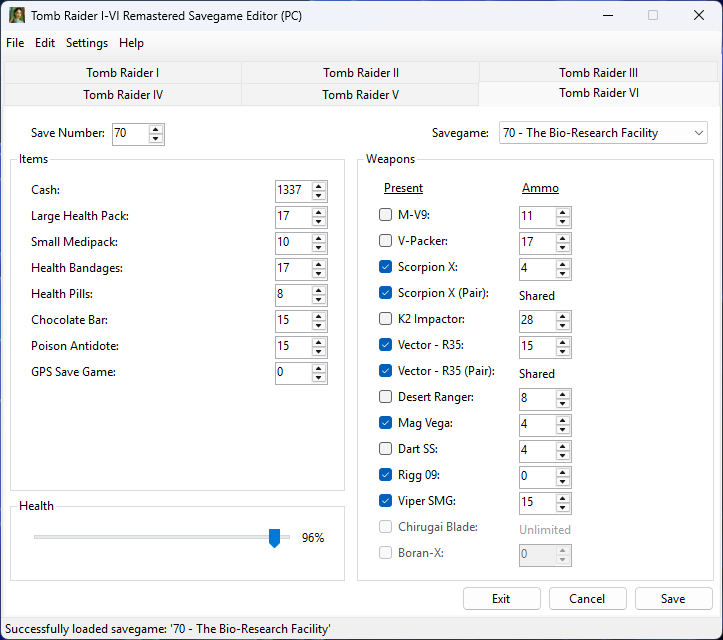
Here are the steps to follow:
- Download the EXE file from the Github link above, in the Releases
- Open the program, it will prompt you to select your savegame folder, you can do it now if you wish
- Select the game you wish, for example Tomb Raider I. In the File menu you can set the savegame file folder.
- The savegame.dat files are located in
%appdata%/TRXfor Tomb Raider 1-3 Remastered, and%appdata%/TRX2for Tomb Raider 4-6 Remastered. You will find a folder with some numbers inside here, depending on which games you have saves for. The folders I just mentioned can also be reached usually atC:/Users/yourusername/AppData/Roaming - After setting the paths for your savegame.dat files, you will be able to edit your save data, for example the number of medipacks or ammo for each game!
If this guide was useful, follow me on Facebook and subscribe on Youtube!
Also read: